You can print from an external storage device connected to the Artisan 700 Series, such as a USB flash drive, or an external CD or DVD burner, or external hard drive.
Note:
Epson cannot guarantee the compatibility of any drives. You may not be able to print photos from the storage device if they were saved to the device using a product other than the Artisan 700 Series.
Epson cannot guarantee the compatibility of any drives. You may not be able to print photos from the storage device if they were saved to the device using a product other than the Artisan 700 Series.
|
1.
|
Remove any inserted memory card from the Artisan 700 Series.
|
|
2.
|
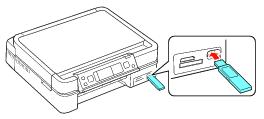
Insert your USB flash drive or the USB cable for your external drive to the
 USB connector on the front of your Artisan 700 Series. USB connector on the front of your Artisan 700 Series. |
|
5.
|
|
6.
|
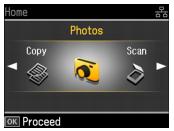
Press OK.
|
|
7.
|
 or
or  to select
 |
8.
|
Follow the instructions in View Photos on Card or Flash Drive to select photos and print settings, and then print your photos.
|