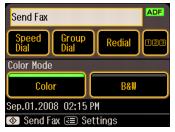
You can send your fax by manually entering a fax number, redialing the previous fax number, or selecting an entry from your speed dial list or group dial list.
|
1.
|
|
2.
|
 , then use the
 If you’ve connected a telephone to the Artisan 800 Series, you can use it to dial the fax number. After dialing the number from the phone, you see the screen below:
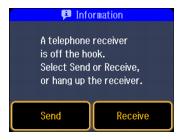
Select Send. This opens a channel of communication to the receiving fax machine. Continue with step 4 to select other settings and scan your document.
Select Speed Dial or Group Dial. Select the number of the speed dial or group dial entry you want to use, then press OK.
If you want to redial the last fax number you used, press Redial. The last fax number is displayed on the screen.
|
4.
|
Note:
If the recipient’s fax machine prints only in black and white, your fax data is automatically sent in black and white even if you select color.
If the recipient’s fax machine prints only in black and white, your fax data is automatically sent in black and white even if you select color.
|
5.
|
|
•
|
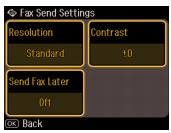
Resolution to increase the scanning resolution of the transmitted document
|
|
•
|
Contrast to change the contrast of the transmitted document
|
|
•
|
Send Fax Later to specify what time you want to send your fax. (You cannot send another fax job until the delayed fax has been transmitted or cancelled.)
|
Press OK when done selecting the settings.
|
6.
|
Press OK to see a summary of your fax transmission settings, if desired.
|
|
7.
|


If you are scanning with the Automatic Document Feeder, your document is automatically scanned and faxed.
If you placed your document on the scanner glass, you see this screen after the first page is scanned:
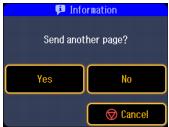
If you need to fax additional pages, place your original on the scanner glass. Select Yes, then press OK to continue. If you do not need to fax another page, select No. Your document is faxed.