You can print on #10 envelopes (4 1/8 × 9 1/2 inches).
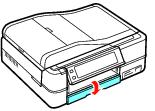

|
3.
|
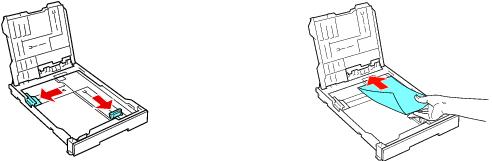
Squeeze the edge guides and slide them out. Then load up to 10 envelopes with the flap facing up and on the left side.
|

|
5.
|
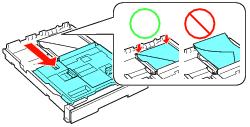
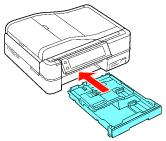
Slide the photo tray forward and make sure the envelopes are not riding up the back of the paper cassette. Then slide the photo tray all the way back.
|

Note:
Avoid using envelopes that are too thin, because they may curl during printing.
Do not use envelopes that are curled or folded.
Before you print, make sure you select Envelope as the paper Type, Envelope #10 as the Size, and Landscape orientation. In Mac OS X, select Extension Settings, then Thick paper and envelopes.
Avoid using envelopes that are too thin, because they may curl during printing.
Do not use envelopes that are curled or folded.
Before you print, make sure you select Envelope as the paper Type, Envelope #10 as the Size, and Landscape orientation. In Mac OS X, select Extension Settings, then Thick paper and envelopes.
Print on Envelopes (Mac OS X 10.5)
Print on Envelopes (Mac OS X 10.3 and 10.4)