
Reference Guide

Index
Help
Safety
Contents
Glossary

Copying / How to Copy

Draft Copying

You can copy a document or photo faster than with standard copying using the draft copying function.

Follow steps 1 to 4 in Standard Copying.

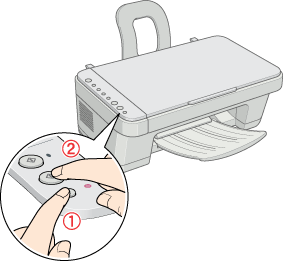
While pressing the Stop button, press the  Start Color button to copy in color or the  Start Black and White button to copy in grayscale.
Note:
  • The quality of a draft copy is not as high as the quality of copies made with standard copying. Draft copies are printed at a resolution of 360 x 120 dpi.
  • Draft copying is only possible when Letter/A4 (plain paper) is selected. For more information about selecting the paper size, see Switching the Paper Size.


[Top]

Version 1.00E, Copyright © 2003, SEIKO EPSON CORPORATION