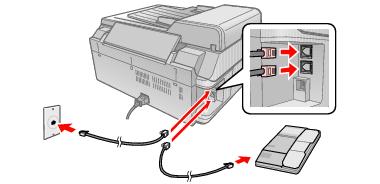
If you’re connecting the CX9400Fax Series to a phone line, and connecting a telephone or answering machine to the same phone line so you can use it to make voice calls, follow these steps:
|
1.
|
Connect the phone cable from the wall jack to the LINE port on the back of the CX9400Fax Series.
|
Note:
If you’re connecting the CX9400Fax Series to a DSL phone line, you must plug a DSL filter into the wall jack or you won’t be able to use the fax or telephone equipment as described below. Contact your DSL provider for the necessary filter.
If you’re connecting the CX9400Fax Series to a DSL phone line, you must plug a DSL filter into the wall jack or you won’t be able to use the fax or telephone equipment as described below. Contact your DSL provider for the necessary filter.
|
2.
|
To use a telephone or answering machine, you need a second phone cable. Connect one end of the cable to the telephone or answering machine, and connect the other end to the EXT. port on the back of the CX9400Fax Series. You can also plug it into another wall jack on the same line, if there’s one available.
|
If you’ve connected an answering machine, you may need to adjust the number of rings after which the CX9400Fax Series picks up.