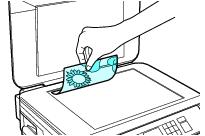
Before you copy or scan, place your original documents or photos for scanning. You can place documents or photos up to letter- or A4-size on the scanner glass.
Caution:
Do not place anything on top of the document cover or use the cover as a writing surface, or it could get permanently scratched.
Do not place anything on top of the document cover or use the cover as a writing surface, or it could get permanently scratched.
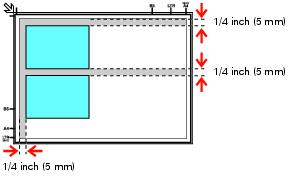
If you are copying multiple photos using the Copy/Restore function, place them as shown below and at least 1/4 inch (5 mm) apart. You can copy up to two photos at a time, up to 4 × 6 inches (102 × 152 mm) in size.
You can also scan multiple photos with the Epson Scan software