If you move your printer some distance, you need to prepare it for transportation in its original box or one of a similar size.
Caution: To avoid damage, always leave the ink cartridges installed when transporting the printer.
|
1.
|
Turn on the printer, wait until the print head locks in the far right position, then turn off the printer.
|
|
4.
|
Remove any paper from the printer, push down the paper support extension, and close the paper support.
|
|
5.
|
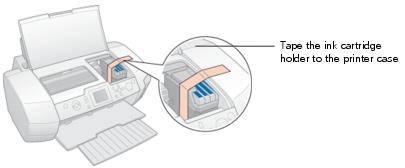
Open the printer cover. Secure the ink cartridge holder to the printer with tape as shown, then close the printer cover.
|
|
6.
|
Make sure the CD/DVD tray guide is closed, then push in the output tray extension and close the output tray.
|
|
7.
|
Repack the printer and its attachments in the original box using the protective materials that came with them. See your Start Here sheet.
|
Keep the printer level as you transport it. After transporting the printer, remove the tape securing the print head and test your printer. If you notice a decline in print quality, clean the print head (see Cleaning the Print Head); if output is misaligned, align the print head (see Aligning the Print Head).