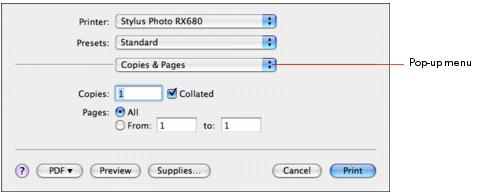
After selecting your page options, open the Print window to select your print options.
|
1.
|
|
2.
|
|
3.
|
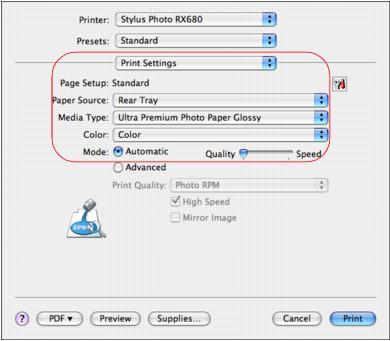
Select Print Settings from the pop-up menu.
|
|
•
|
Front Tray: prints using the front paper cassette.
|
|
•
|
Rear Tray: prints using the rear sheet feeder.
|
|
•
|
Automatic: automatically selects the paper source based on the paper Type and Size settings selected.
|
|
5.
|
Select the Media Type setting that matches the paper you loaded.
|
|
6.
|
|
7.
|
|
8.
|
Move the Quality/Speed slider as necessary to select higher quality or faster print speed.
|
|
•
|
Adjust the amount of image expansion when printing borderless photos
|
|
•
|
Schedule printing for another time
|