If you need to ship your product or transport it a long distance, prepare it for transportation as follows:
|
1.
|
Turn off the WorkForce 520 Series.
|
Note:
Always turn off the product using the On button, and wait until the
  On light stops flashing before unplugging the product or cutting off power to the electrical outlet.
Always turn off the product using the
On button, and wait until the On light stops flashing before unplugging the product or cutting off power to the electrical outlet.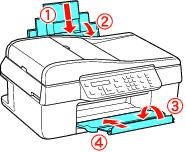
|
4.
|
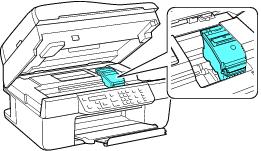
Lift up the scanner and check that the ink cartridge holder is all the way to the right (the home position). If necessary, turn on the WorkForce 520 Series, wait until the print head locks into the home position, then turn it off again.
|
|
5.
|
Fasten the ink cartridge holder to the case using tape. Leave the ink cartridges installed to avoid damaging the product.
|
|
8.
|
Pack the product in its original box or one of a similar size using protective material to keep it from moving inside the box.
|
If print quality has declined when you print again in a new location, clean and align the print head.