You can copy documents onto letter- or A4-size plain paper, Epson Bright White Paper, or Epson Presentation Paper Matte, just like on a copy machine.
Note:
When originals are loaded in the Automatic Document Feeder, letter-size paper plain paper is automatically selected for your printed copies. If you copy a legal-size document, the image will be cropped. To copy a full legal-size document onto letter-size paper, press , then select Paper and Copy Settings. Select Reduce/Enlarge, then select Legal->Letter, then press OK.
When originals are loaded in the Automatic Document Feeder, letter-size paper plain paper is automatically selected for your printed copies. If you copy a legal-size document, the image will be cropped. To copy a full legal-size document onto letter-size paper, press
, then select Paper and Copy Settings. Select Reduce/Enlarge, then select Legal->Letter, then press OK.|
1.
|
Load letter- or A4-size plain paper in cassette 1 or 2 or Epson special paper in cassette 1.
|
|
2.
|
Place your original document on the scanner glass or load your documents in the Automatic Document Feeder.
|
|
3.
|
 if necessary and select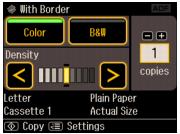
|
4.
|
|
5.
|
Press – or + to select the number of copies you want (up to 99). Or press the number 1 to display the numeric keyboard, then select the number and press OK.
|
|
6.
|
Press
 or or  to adjust the Density (darkness or lightness) of the copy if necessary. to adjust the Density (darkness or lightness) of the copy if necessary. |
|
7.
|
To change other print settings, press
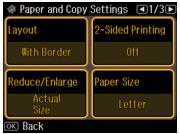
 , then select Paper and Copy Settings. , then select Paper and Copy Settings. |
|
•
|
To reduce your originals so that pages print side-by-side, two per sheet, select Layout and then select 2-up Copy. This is for use only with single-sided originals; be sure to load them the correct direction.
|
|
•
|
To scan double-sided originals or make double-sided copies, select 2-Sided Printing, then select the desired option.
|
If you’re printing double-sided, you can also select the Binding Direction. If smudges or marks appear on the front of your paper when printing the second side, increase the Dry Time setting.
|
•
|
To adjust the copy size, select Reduce/Enlarge and choose Actual Size, Auto Fit Page (to automatically size the image to fit your paper), Custom Size (to select a percentage using
 or or  ), or any of the specific sizing options offered. ), or any of the specific sizing options offered. |
|
•
|
To change the paper size, select Paper Size and choose the size of paper you loaded.
|
|
•
|
|
•
|
To change the cassette, select Paper Source and choose the cassette you want. To print a large number of copies at the same time, choose Cassette 1 then 2. Make sure you load the same type of paper in both cassettes.
|
|
•
|
After you finish selecting your settings, press OK to exit the settings menu.
 button to begin copying.
To cancel copying, press  Cancel.
Cancel.