You can
load a single envelope or large, thick, or folded original in the
input tray. Make sure the original meets the specifications for
special originals before loading it.
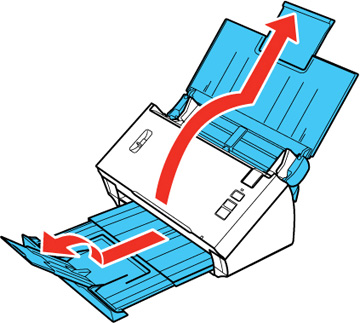
- Pull out the output tray and open its extension.
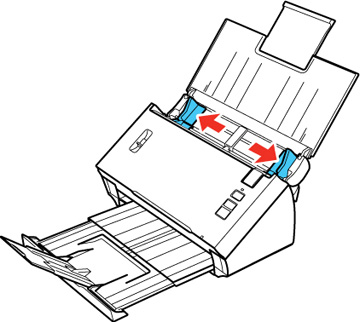
- Slide the input tray edge guides all the way out.
- Do one
of the following to load your original:
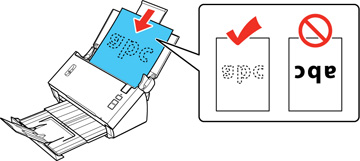
- Load a large or thick original or an envelope in the input tray as shown. Make sure the printed side is facedown and top edge first.
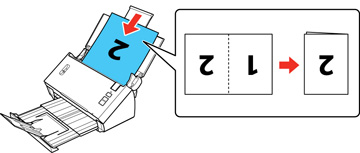
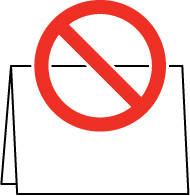
- For a folded
original, fold and load the original as shown.
Caution:
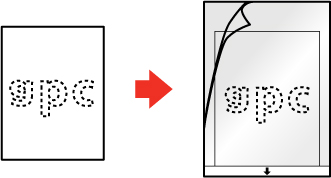
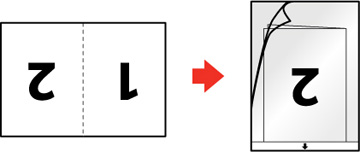
- For a photo
or an irregularly-shaped original, use an optional carrier sheet to
load the document. Do the following to load the document into the
carrier sheet:
- If the original is smaller than the carrier sheet, insert it in the center of the sheet with the printed side facedown and the top facing the arrow on the sheet.
- If the original is larger than the carrier sheet, fold it in half with the sides to be scanned facing out. Position the right side of the original faceup with the top facing the arrow on the sheet.
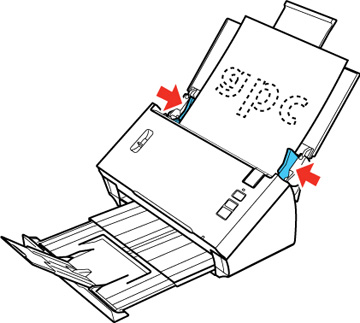
- Slide the edge guides against the edges of the sheet.
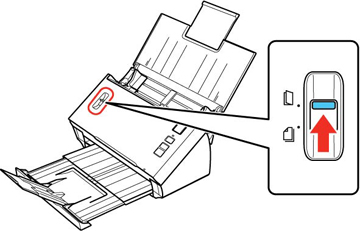
- Set the
page separation lever to the position shown here.
Note: To prevent paper jams, make sure to set the separation lever back to its original position when scanning standard single- or multi-page documents.