If you have
a WPS-enabled wireless router or access point, you can use Wi-Fi
Protected Setup (WPS) to connect your product to the network.
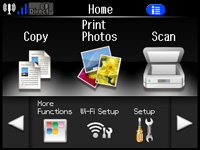
Press
the home button, if necessary.
Select
Wi-Fi Setup. You
see this screen:
Select
Push Button Setup
(WPS).
Follow
the instructions on the LCD screen to complete WPS setup. If
the network connection is successful, a Wi-Fi antenna icon with
blue connection bars is displayed in the upper-left corner of the
LCD screen.
 home
home