You can
check the status of your ink and maintenance box by checking the
lights on your product.
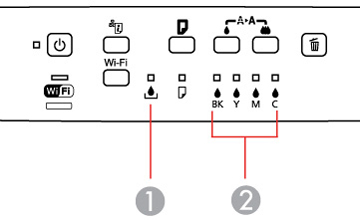
| 1 | The  maintenance box light maintenance box light |
| 2 | The  ink out lights ink out lights |
- If the light is flashing, ink is low, or the maintenance box is nearing the end of its service life. You can continue printing until the ink or maintenance box needs replacement.
- If the light is red, the ink is expended or the maintenance box is at the end of its service life. You must replace the ink or maintenance box before you can print.