Setting Up File Sharing for File Transfers From Your Computer

Before you transfer files from a computer to a USB flash drive inserted into the USB port on the front of your product, you may need to set up your product's file sharing settings.
Caution:
Remove the flash drive before you change this setting or you may lose data from the flash drive.
Note: These settings can be locked by an administrator. If you cannot access these settings, contact your administrator for assistance.
  1. Press the  home button, if necessary.
  2. Select Setup.
  3. Scroll down and select System Administration. Enter the administrator password, if necessary.
  4. Select Printer Settings.
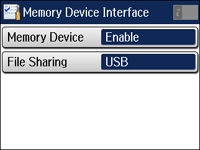
  5. Select Memory Device Interface. You see a screen like this:


  6. Make sure Memory Device is set to Enable.
  7. Select File Sharing.
  8. Select the way your computer is connected to the product: either USB or Wi-Fi/Network.