You can
adjust print order and the size of the image as you print it by
selecting Paper Handling from the
pop-up menu on the Print window.
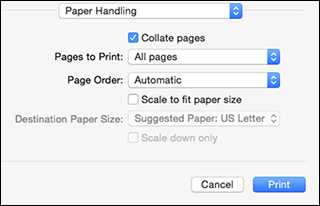
- To print only selected pages in a multi-page document, select an option from the Pages to Print pop-up menu.
- To adjust the order in which pages are printed, select an option from the Page Order pop-up menu.
- To scale the image to fit on a specific paper size, select the Scale to fit paper size checkbox and select a paper size from the Destination Paper Size pop-up menu.