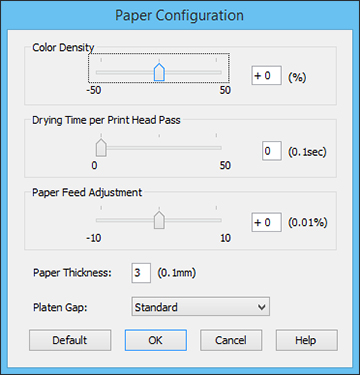
- Color Density
- Adjusts the ink saturation level.
- Drying Time per Print Head Pass
- Pauses print head movement for up to 5 seconds after each pass to allow ink to dry. This lets you print with non-Epson media and avoid smearing the ink.
- Paper Feed Adjustment
- Modifies the speed of the paper feeding to compensate for banding in the direction of the print head.
- Paper Thickness
- Lets you select the thickness of your paper or media.
- Platen Gap
- Adjusts the distance from the paper to the print head. (Use a wider setting if you are seeing edge marks or scuffs on your prints.)