If you have
a WPS-enabled router or access point, you can use Wi-Fi Protected
Setup (WPS) to connect your product to the network.
- Press the WPS button on your router.
- On the product, press the
 home button, if
necessary.
home button, if
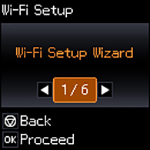
necessary. - Press the arrow buttons to select Wi-Fi Setup and press the OK button. You see this screen:
- Press the arrow buttons to select Push Button (WPS), and press the OK button.
- Follow the instructions on the LCD screen to complete WPS
setup. If the network connection is successful, a Wi-Fi icon
with connection bars
 is displayed in the upper right corner
of the LCD screen.
is displayed in the upper right corner
of the LCD screen.