If the media
holding plates that came with your product become damaged or
deformed, you need to replace them.
If you need to replace the insertable media holding plates, replace both plates with sliding media holding plates instead.
Caution:
Continued use of damaged or deformed media
holding plates may damage the print heads.
- Remove
any media loaded in the product and press the
 power button to turn off the
product.
power button to turn off the
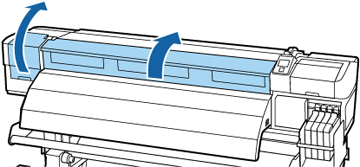
product. - Open the left maintenance cover and the front cover.
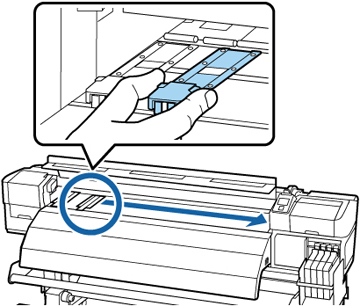
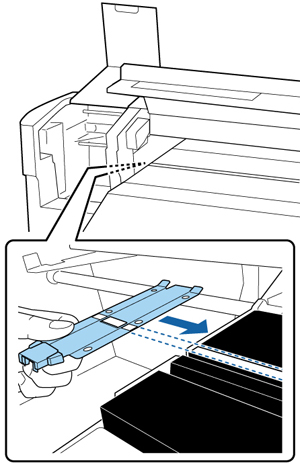
- Grasp the tabs on the media holding plates and slide them to the left edge of the platen.
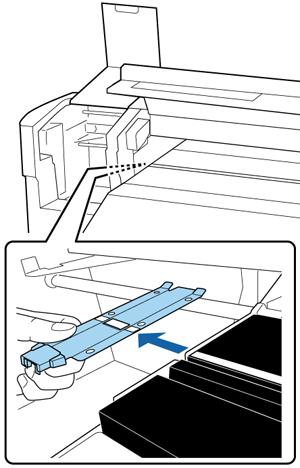
- Remove the left media holding plate as shown here, then remove the right media holding plate in the same manner.
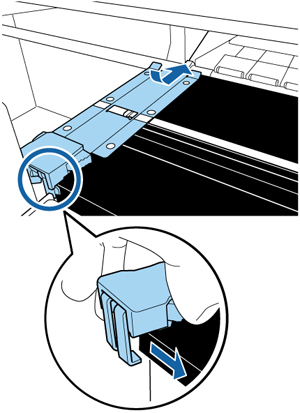
- Align the white line on a new media holding plate with the edge of the platen.
- While pressing the tip of the media
holding plate against the platen, attach the hooks to the front
corner of the platen.
Caution:Do not install the media holding plates on the right edge of the platen or they could drop into the product and cause it to malfunction.
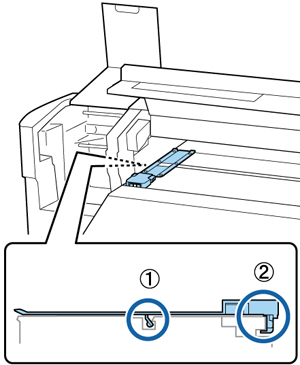
- Confirm that the two hooked sections
of the media holding plate are securely attached as shown here,
with no gap between the plate and the platen.
- The latch at the rear of the square hole (1) should rest in the groove on the platen.
- The latch at the rear of the tab (2) should hook onto the front corner of the platen.
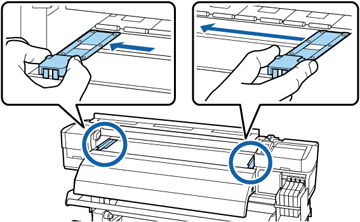
Caution:If the media holding plates are not attached correctly, repeat these steps to reattach them or the print heads may be damaged. - Grasp the tabs on the media holding
plates and slide them to the left and right edges of the platen.
Release the tabs when they are in position.