Clean your
product periodically, and if you notice it is dirty on the inside
or outside.
Caution:
If dust or other particles remain on the
platen inside the product, the print head nozzles may clog or the
print head may be damaged.
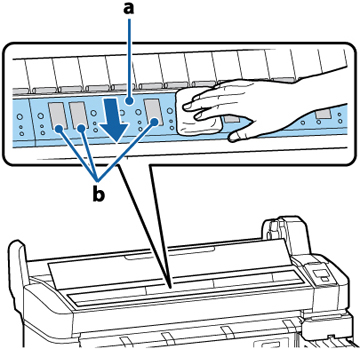
- Open the printer cover and use a soft,
clean cloth to carefully clean platen area (a) as shown here. Wipe
from the inside of the printer toward the outside to avoid
spreading dirt.
Caution:As you clean, do not touch the ink tubes, rollers, or platen area (b) shown here to avoid staining future prints. If necessary, clean area (a) using a cloth dampened with mild detergent and wipe dry with a soft cloth.
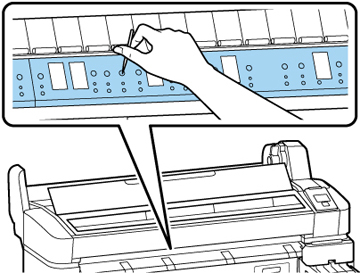
- If any paper dust accumulates in the platen holes, gently remove it using a pointed object.
- To clean the pressure rollers, press
the
 cut/feed media button, then
hold down the down arrow button to feed paper over the
rollers.
cut/feed media button, then
hold down the down arrow button to feed paper over the
rollers.