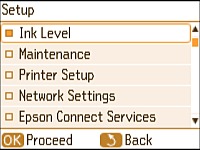
Checking Cartridge Status on the LCD Screen
You can check the status of your ink cartridge using your product's LCD screen.
Press the
home
button, if necessary.
Press the arrow buttons to select
Setup
and press the
OK
button.
Select
Ink Level
and press the
OK
button.
The ink cartridge status is displayed.
Note:
Displayed ink level is approximate.
Press the
OK
button to exit.
Parent topic:
Check Cartridge Status
Related tasks
Removing and Installing the Ink Cartridge
Was this page helpful?
Yes
or
No
.
Privacy Policy
|
Your California Privacy Rights
|
Terms of Use
 home
home