When you finish printing on roll paper, you
should remove it from the printer to avoid indenting or creasing
the paper.
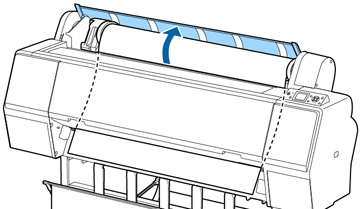
- Open the roll paper cover.
- Press the
 load paper button to release
the paper. The following may now occur:
load paper button to release
the paper. The following may now occur:
- If automatic media tracking is on, the barcode and paper information is printed.
- If you are not using the optional Auto Take-Up Reel, the paper rewinds automatically.
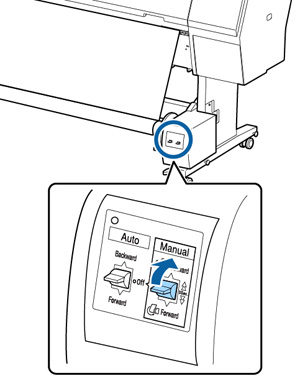
- If you are using the optional Auto Take-Up Reel, rewind the paper using the Manual switch.
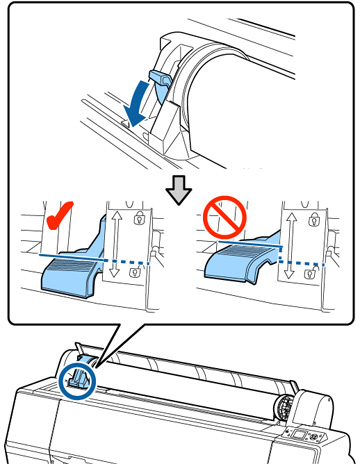
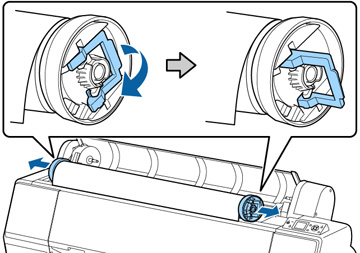
- Firmly push down the lock lever on the
roll paper holder to release it.
Note: Make sure you push the lock lever all the way down to unlock it completely.
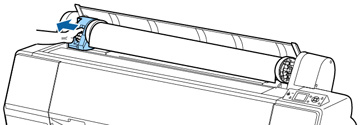
- Using the handle, slide the roll paper
holder all the way to the left and remove it from the end of the
roll.
Note: Always use the handle when sliding the roll paper holder.
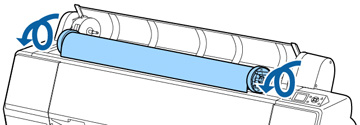
- Roll the paper forward so that it rests on top of the printer.
- Pull up the tension levers on the roll media adapters and remove the adapters from both ends of the paper roll.