The tensioner keeps the roll media from
becoming too slack. Use the tensioner only when printing on these
media types: Epson Singleweight Matte Paper,
Epson Premium Glossy Photo Paper (170), Epson
Premium Semigloss Photo Paper (170), and other thin media
wider that 17 inches (432 mm). You need to adjust the width of the
tensioner to match the roll paper you are using before inserting
it.
- Attach the right flange to the right end of the large tension pipe.
- If the roll paper you are using is
wider than 24 inches (610 mm), attach small tension pipes to the
left end of the large tension pipe as necessary.
Note: Each small tension pipe adds 10 inches (254 mm) of width to the tensioner. Add up to 4 small tension pipes to the large tension pipe, as necessary.
- Attach the left flange to the left end
of the tension pipe.
Note: Make sure the flange is set wider than the width of the roll media.
- Do one of the following:
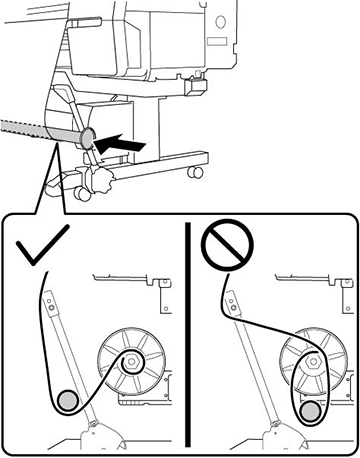
- If you attached media to the roll core with the printable side in, insert the tensioner as shown here.
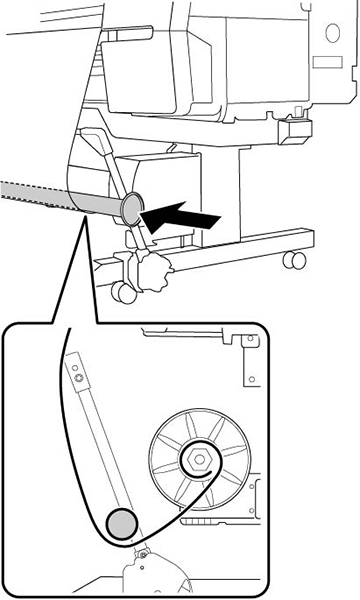
- If you attached media to the roll core with printable side out, insert the tensioner as shown here.
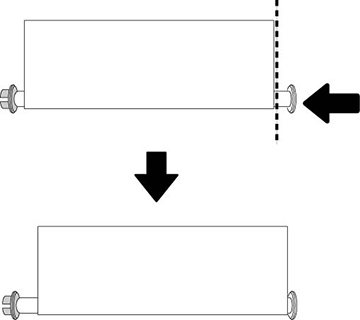
- Align the tensioner with the right edge of the paper as shown.
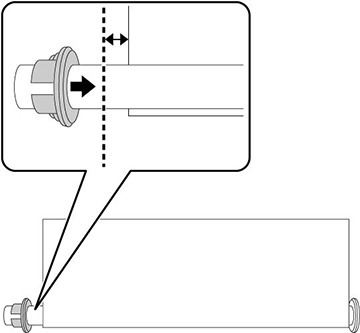
- Adjust the flange on the left side of the tensioner so that there is a gap of about 0.25 inch (6 mm) between the flange and the roll paper.