Make sure
you have your replacement cartridges handy before you begin. You
must install new cartridges immediately after removing the old
ones.
Note: Replace all
expended ink cartridges. You cannot print if any of the ink
cartridges are expended or any ink slots are empty.
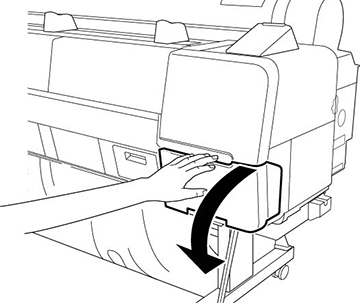
- Open the ink cartridge cover.
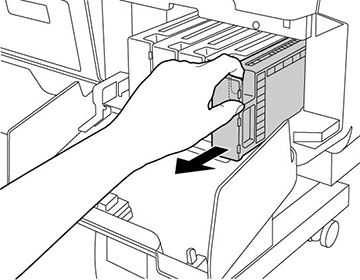
- Insert your finger into the notch in
the top of the cartridge and pull it straight out of the
printer.
Note: Dispose of used cartridges carefully. Do not take the used cartridge apart or try to refill it.Warning: If ink gets on your skin, wash it thoroughly with soap and water. If ink gets into your eyes, flush them immediately with water. If ink gets into your mouth, spit it out and see a doctor right away. Keep ink cartridges out of the reach of children.
- Remove the new cartridge from the
package. Then gently shake the cartridge for about ten
seconds.
Caution:Do not touch the green chip on the cartridge.
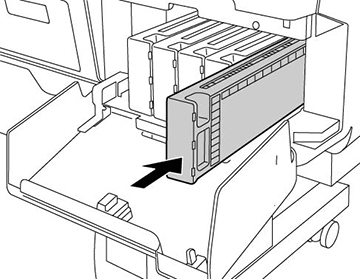
- Insert the new cartridge with the
arrow facing up and push it in until it clicks into place.
Caution:Do not remove and re-insert cartridges more often than necessary. Doing so can break the needle valve seal and allow air to enter the ink tubes, damaging the nozzles.Note: Shake ink cartridges every 3 months after installation.

Your product
begins charging the ink delivery system. Do not turn off the
product during ink charging.
Caution:
If you remove an ink cartridge for later use,
protect the ink supply area from dirt and dust and store it in the
same environment as the printer. The valve in the ink supply port
is designed to contain any excess ink, but do not touch the ink
supply port or surrounding area. Always store ink cartridges with
the label facing up; do not store cartridges upside-down.
Note: If a
cleaning cycle starts when the printer is in a "Ink Low" status and
the level of ink is less than that required for a cleaning,you see
a prompt telling you that there is not enough ink to clean the
print head. Install a full cartridge to complete the cleaning
cycle. At the end you can reinstall the original
cartridge.