Settings on the Network menu let you view network information and set up the projector for monitoring and control over a network.
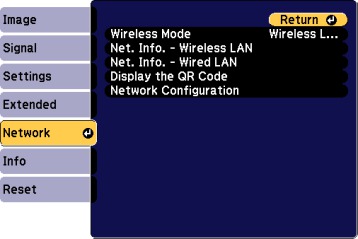
| Setting | Options | Description |
|---|---|---|
| Wireless Mode | — | Enable or disable wireless communication |
| Net. Info - Wireless LAN | Connection mode
Antenna level Projector Name SSID DHCP IP Address Subnet Mask Gateway Address MAC Address Region Code |
Displays wireless network status and details |
| Net. Info - Wired LAN | Projector Name
DHCP IP Address Subnet Mask Gateway Address MAC Address |
Displays wired network status and details |
| Display the QR Code | — | Displays the QR code |
| Network Configuration | Accesses additional network menus | Configures your network settings |