You can use
the product control panel to change the Eco settings.
Note: The
Sleep Timer setting in Eco Mode overrides the Sleep Timer setting
in Common Settings. This setting can be locked by an administrator.
If you cannot access or change this setting, contact your
administrator for assistance.
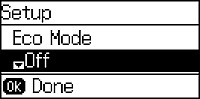
 icon in the corner of the LCD screen to
indicate that Eco settings are enabled.
icon in the corner of the LCD screen to
indicate that Eco settings are enabled.