You
can automatically correct the brightness and tint for multiple
projectors based on the brightness and tint settings you selected
for the master projector.
Before you start, make sure of the following:
- Select Multi-Projection for the Color Mode setting and adjust the Brightness, Contrast, Color Saturation, Tint, White Balance, and Advanced settings in the Image menu, as necessary, on the master projector.
- You are projecting on a matte white diffusion screen that is flat and even.
- The projected image is between 80 to 200 inches (203 to 508 cm) and is rectangular after tiling.
- All the projectors are connected to a network and the Location Setup setting has been configured.
- Nothing is blocking the built-in camera on the front of each projector.
Note: Auto
adjustment is not available for the following lenses: ELPLX01, ELPLR04, ELPLM11, ELPLM07, ELPLL08, ELPLL07 (Pro
L1100U/L1200U/L1300U/L1405U) and ELPLR04, ELPLL08, ELPLL07 (Pro
L1500U/L1505U). After auto adjustment, the movement range
for lens shift is reduced.
- Press the Menu button.
- Select the Extended menu and press Enter.
- Select the Multi-Projection setting and press Enter.
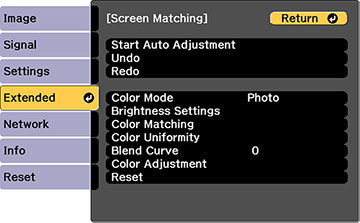
- Select the Screen Matching setting and press Enter.
- Select Start Auto Adjustment press Enter. When adjustment starts, you see an adjustment pattern. Adjustment is complete when you see a displayed image.