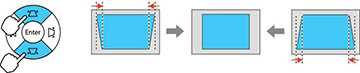
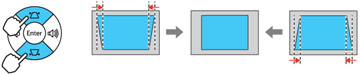
You
can use the projector's keystone correction buttons to correct the
shape of an image that is unevenly rectangular on the sides.
Note: To
provide the best possible image quality, adjust the projector's
position to correct the image shape. If this isn't possible, use
the keystone correction buttons on the projector to correct the
image shape.
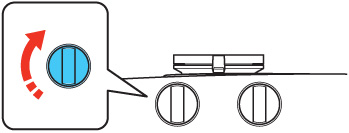
Note: To use
the keystone correction feature, you must first set the lens to the
center-top position using the lens shift dials.
Note: Wait 30
minutes after turning on the projector before setting the focus for
maximum accuracy.
- Turn on the projector and display an image.
-
Press one of these keystone buttons on the
control panel to display the Keystone adjustment screen.
PowerLite Home Cinema 3100
PowerLite Home Cinema 3700
-
Press a keystone button on the projector's
control panel to adjust the image shape. After correction,
your image is slightly smaller.
Note: If the projector is installed out of reach, you can also correct the image shape with the remote control using the Keystone settings in the projector menus.