You can
enable Wi-Fi Direct mode to allow direct communication between your
product and computer or other devices without a wireless router or
access point.
- Press the
 home button, if
necessary.
home button, if
necessary. - Press the arrow buttons to select Wi-Fi Setup and press the OK button.
- Press the right arrow button to select Wi-Fi Direct and press the OK button.
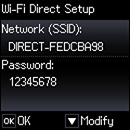
- Press the OK button three more times. You see this screen:
- Press the OK button to complete
setup. You see the
 icon on the LCD screen and should be
able to connect to your product directly from your computer or
device, and then print. If you are printing from a computer, make
sure you installed the network software as described on the
Start Here sheet.
Note: Make a note of the SSID and password that appear. If you want to change the password, see the link below.
icon on the LCD screen and should be
able to connect to your product directly from your computer or
device, and then print. If you are printing from a computer, make
sure you installed the network software as described on the
Start Here sheet.
Note: Make a note of the SSID and password that appear. If you want to change the password, see the link below.
 icon is displayed on the LCD screen,
Wi-Fi Direct mode is not enabled. Repeat these steps to try
again.
icon is displayed on the LCD screen,
Wi-Fi Direct mode is not enabled. Repeat these steps to try
again.