The pigment
particles in the ink cartridges can settle, causing the print
quality to decline and the printer to possibly malfunction.
If an ink cartridge runs out during printing, you
can continue printing after replacing the ink cartridge. However,
there may be a slight decline in quality in the area where the
cartridge was changed.
Caution:
For best results, always use genuine Epson ink
cartridges. Epson cannot guarantee the quality or reliability of
non-genuine ink. The use of non-genuine ink may cause damage that
is not covered by Epson's warranties and, under certain
circumstances, may cause erratic printer behavior. Information
about non-genuine ink levels may not be displayed, and use of
non-genuine ink is recorded for possible use in service
support.
Note: Do not
refill the ink.
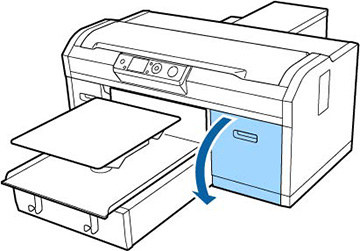
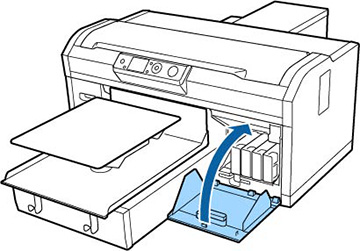
- Open the cartridge cover.
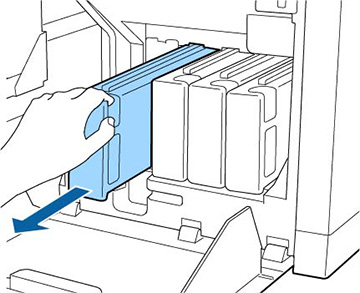
- Put your
finger into the indentation on top of the ink cartridge and pull it
straight out of its slot.
Note: Removed ink cartridges may have ink around the ink supply port, so be careful not to get ink on the surrounding area.
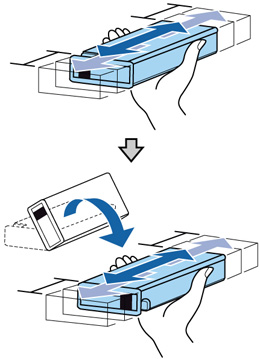
- Rapidly
shake each new ink cartridge for about 15 seconds. For White ink,
flip the cartridge over as shown and repeat.
Caution:Do not touch the IC chip on the end of the cartridge; otherwise, the cartridge may not be recognized, or the printer may not print properly.
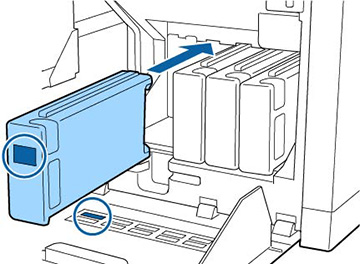
- Hold the
cartridge with the label side facing the side of the printer and
slide it all the way into the slot.
Note: Make sure that the color of the ink cartridge matches the color of the label on the printer.
- Close the ink cartridge cover.