You can
install up to three optional paper cassette units to provide more
paper capacity. If you are using the optional cabinet, install the
cabinet under the bottom optional cassette unit first.
- Turn off the product, and
unplug the power cord and any connected cables.
Warning: To avoid electric shock, make sure you unplug the power cord.
- Uninstall any optional
cassette units already installed on the product.
Note: To uninstall optional cassette units, turn off the product, unplug the power cord, disconnect any cables, and follow the rest of these instructions in reverse.
- Remove the paper cassette unit from its packaging and remove any protective materials.
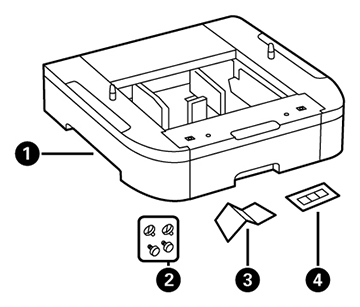
- Make sure you have all the
items shown here:
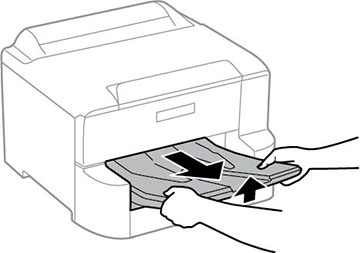
1 Optional cassette 2 Screws (×4) 3 Paper size label 4 Cassette number sticker - Remove the output tray.
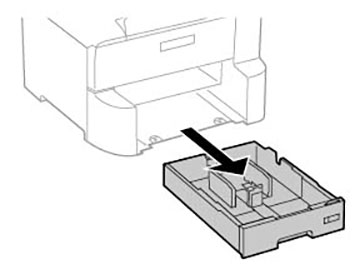
- Remove the paper cassette from the product.
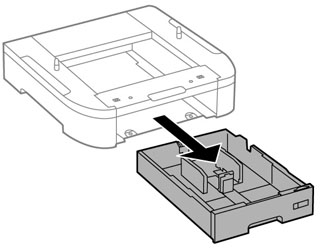
- Remove the paper cassette from the optional paper cassette unit.
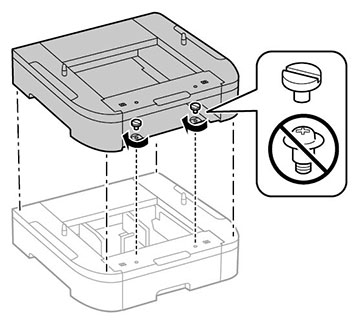
- Stack all optional paper cassette units on top of each other and secure them to each other with the included screws.
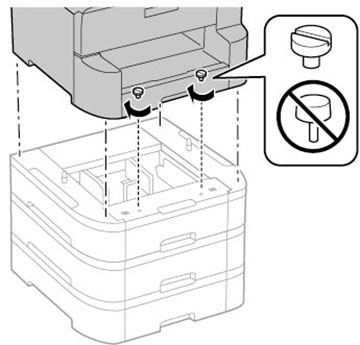
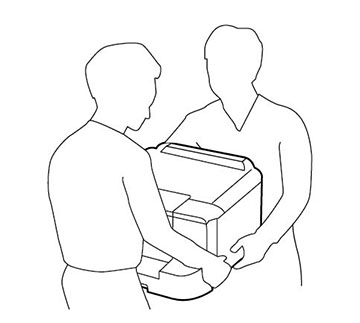
- Lift up your product and
gently lower it onto the paper cassette unit with the corners
aligned. Secure the product to the paper cassette unit with the
included screws using a screwdriver.
Note: Screws may be left over after installation.
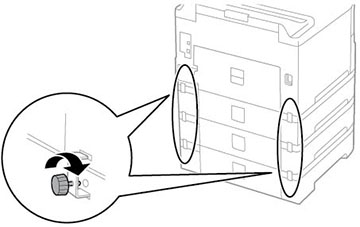
- Secure the back of the paper cassette units to each other and to the product using the included brackets and screws.
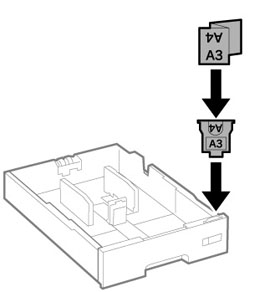
- Insert a label into the holder indicating the paper size to be loaded in each of the paper cassettes.
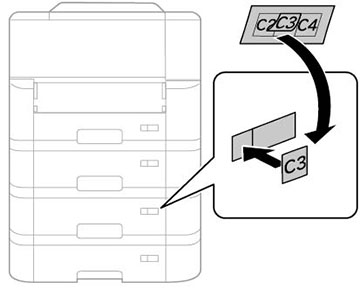
- Insert the paper cassette and place the correct sticker on the cassette unit to indicate the cassette number.
- Attach the output tray.
- Connect the power cord and other connection cables, then plug in the product.
- Turn on the product.
- Pull out and reinsert the paper cassettes in the optional paper cassette units and confirm that each cassette unit number is displayed on the screen.
- Enable the optional paper cassette units in the printer software.