You can purchase a license key to
activate Invoice/Receipt Manager. An internet connection is
required.
Note: The license
key can only activate one scanner.
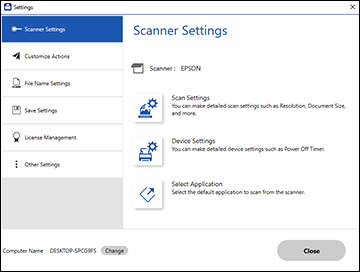
Click the Settings button in Epson ScanSmart. You
see a screen like this:
Click the License Management tab. You see a screen
like this:
To purchase a new license key, click
Purchase License Key. The
Epson product page opens in your web browser where you can purchase
the license key. If you already have a license key, go to step
4.
Make sure the scanner you want to
activate the license key for is displayed at the top of the
screen.
Click Enter
License Key. You see a screen like this:
Enter the license key you purchased
and click Activate.
Click Yes on the next screen (Windows only).
When you see a message indicating that
activation was successful, click OK. The activated scanner and license key
appear in the License Management List.