
| 1 | Slot 1 for installing an interface board (HDMI/DVI-D interface board described below) |
| 2 | Slot 2 for installing an optional DisplayPort interface board (described below) |
| 3 | HDBaseT port |
| 4 | Network LAN port |
| 5 | Computer In port |
| 6 | Computer/BNC Out port |
| 7 | BNC In ports |
| 8 | Cable clip slot |
| 9 | RS-232C port |
| 10 | Remote port |
| 11 | SDI Out port |
| 12 | SDI In port |
| 13 | Service port |
| 14 | USB-A port |
HDMI/DVI-D Interface Board
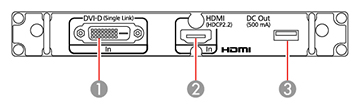
| 1 | DVI-D In port |
| 2 | HDMI In port |
| 3 | DC Out port |
Optional DisplayPort Interface Board
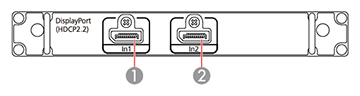
| 1 | DisplayPort In1 port |
| 2 | DisplayPort In2 port |
Caution:
Do not attempt to install or remove your
projector's interface board. Static electricity or other
interference may damage the projector or cause it to malfunction.
Contact Epson to have an interface board installed or
removed.