Adjusting the Screen Brightness
You can adjust the brightness of the LCD screen.
Press the
home
button, if necessary.
Use the arrow buttons to select
Settings
and press the
OK
button.
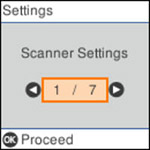
You see a screen like this:
Use the arrow buttons to select
LCD Brightness
and press the
OK
button.
Use the arrow buttons to decrease or increase the brightness.
Press the
OK
button to exit.
Parent topic:
Using the Control Panel
 home
home