If you see
ink on the back of a printout, you can clean the paper guide
rollers to remove any excess ink.
- If printouts are smeared or scuffed, load a few sheets of plain paper in this size: Letter (8.5 × 11 inches [216 × 279 mm]) or A4 (8.3 × 11.7 inches [210 × 297 mm]).
- Make sure there are no errors on the LCD screen.
- Press the
 home button, if
necessary.
home button, if
necessary.
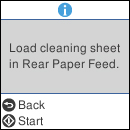
- Select Maintenance > Paper Guide Cleaning. You see a screen like this:
- Press the
 start button to start
cleaning the paper guide.
start button to start
cleaning the paper guide. - Repeat these steps as necessary until the paper comes out clean.