Projector Parts - Remote Control
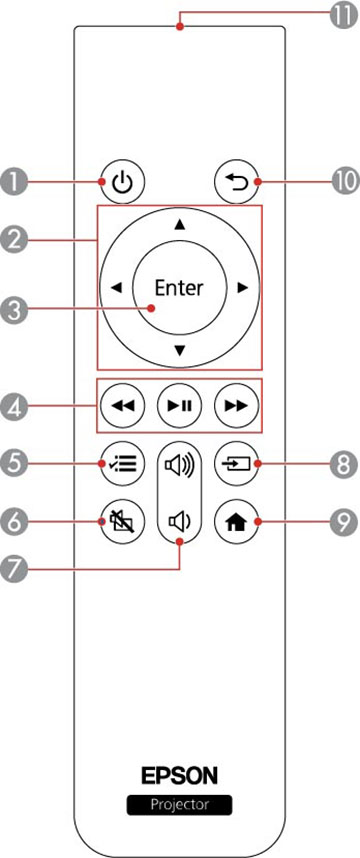
LS500W/B
1
Power
button
2
Arrow buttons (move through on-screen options)
3
Enter
button (selects options)
4
rewind
,
play/pause
, and
fast forward
buttons (control connected streaming device)
5
Menu
button (accesses projector menus)
6
A/V mute
button (turns off picture and sound)
7
volume up
and
volume down
buttons
8
Source
button (changes the input source)
9
Home
button (accesses projector Home screen)
10
Esc
button (cancels/exits function)
11
Remote control emitter
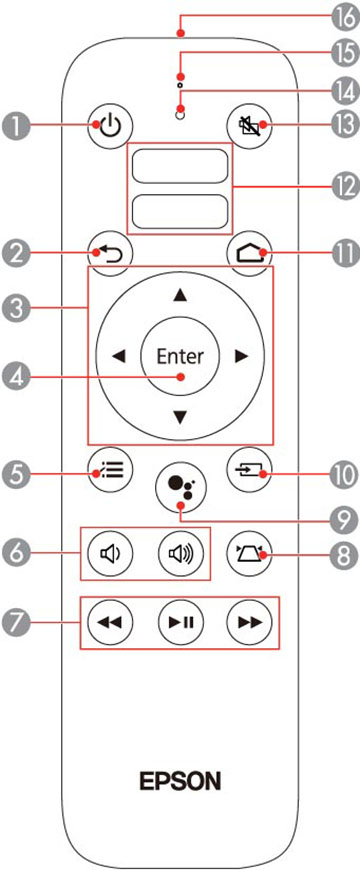
LS500WATV/BATV
Projector remote control
1
Power
button
2
Esc
button (cancels/exits function)
3
Arrow buttons (move through on-screen options)
4
Enter
button (selects options)
5
Menu
button (accesses projector menus)
6
volume up
and
volume down
buttons
7
rewind
,
play/pause
, and
fast forward
buttons (control connected streaming device)
8
keystone
button (corrects vertical/horizontal image distortion)
9
mic
button (operates Android TV using voice commands)
10
Source
button (changes the input source)
11
Home
button (accesses Android TV Home screen)
12
App buttons
13
A/V mute
button (turns off picture and sound)
14
Command light (turns on when the remote control is in operation)
15
Microphone (listens for voice commands after pressing the
mic
button)
16
Remote control emitter
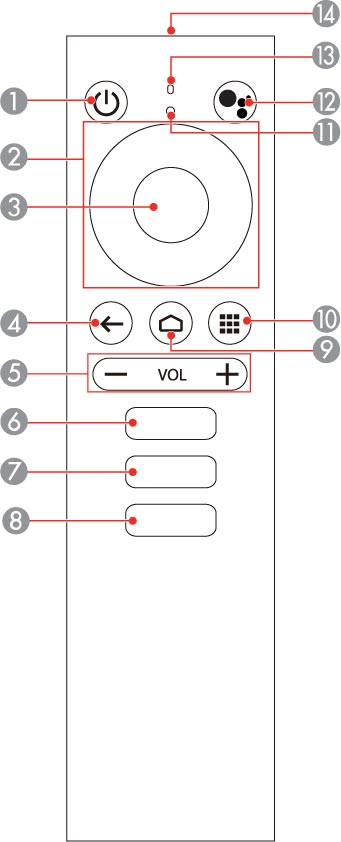
Streaming device remote control
1
Power
button
2
Up/Down/Left/Right buttons
3
Enter
button
4
return button (returns to the previous menu level)
5
Volume down and volume up buttons
6
YouTube button (opens the YouTube app)
7
Netflix button (opens the Netflix app)
8
Google Play button (connects to Google Play)
9
home button (displays the Android TV home screen)
10
apps button (displays list of Android TV apps)
11
Command light (turns on when the remote control is in operation)
12
mic
button (operates Android TV using voice commands)
13
Microphone (listens for voice commands after pressing the
mic
button)
14
Remote control emitter
Parent topic:
Projector Part Locations
Was this page helpful?
Yes
or
No
.
Privacy Policy
|
Your California Privacy Rights
|
Terms of Use

 rewind
 play/pause
 fast forward
 A/V mute
 volume up
 volume down


 keystone
 mic
mic
 return button (returns to the
previous menu level)
return button (returns to the
previous menu level) apps button (displays list of
Android TV apps)
apps button (displays list of
Android TV apps)