Applying Carriage Rod Grease

When you see the message Apply secondary carriage rod grease on the LCD screen, you need to apply grease to carriage rods A and B using the grease and tools that came with your product. Use a new grease pad when applying grease to the carriage rods.
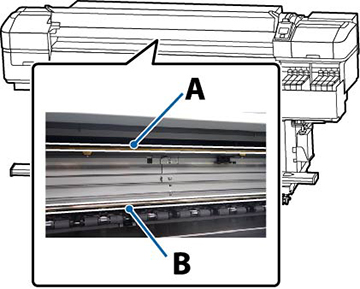

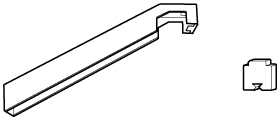
  1. To grease carriage rod A, locate the grease tool and pad A that came with your product.


  2. Press the  maintenance button. You see the Maintenance menu.
  3. Press down arrow button to select Other Maintenance and press the OK button.
  4. Press the OK button to select Grease Carriage Rod. You see the message Grease kit is needed. Continue?.
  5. Press the OK button to select Yes.
  6. Open the front cover.
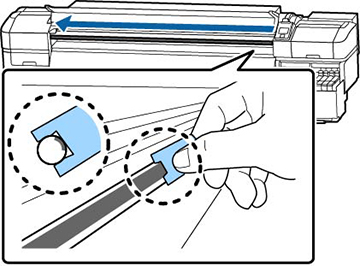
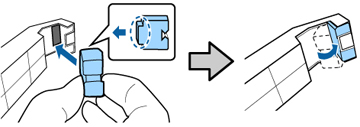
  7. Firmly insert the tab on pad A into the slot on the grease tool and rotate the pad onto the tool as shown here.


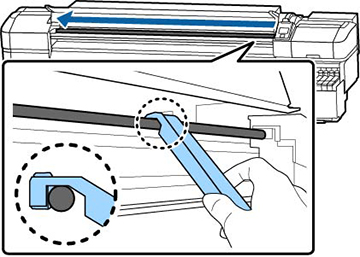
  8. Hold the grease tool against the back of carriage rod A and smoothly slide it from right to left across the carriage rod four times.


    Caution:
    Do not slide the tool back and forth; dust may enter the print head and damage can occur.
  9. Remove the stained pad from the grease tool.
  10. Attach a fresh pad A to the grease tool.
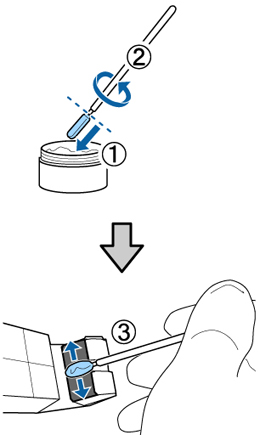
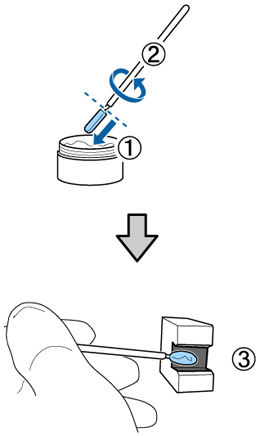
  11. Use one of the cleaning sticks to stir the grease in the container approximately 10 times. Then wipe the tip of the cleaning stick on the edge of the container to remove the excess grease.
    Note: Be sure to remove the excess grease from the cleaning stick or it may fall off the stick and onto the platen or your media.
  12. Fully submerge the tip of the cleaning stick into the grease, rotate the stick two or three times, and remove it from the grease. Then apply the grease to pad A on the end of the grease tool.


  13. Hold the grease tool against the back of carriage rod A and smoothly slide it back and forth twice across the carriage rod to grease the rod, as shown in step 8.
  14. To grease carriage rod B, locate pad B that came with your product.


  15. Hold pad B against the front of carriage rod B and smoothly slide it from right to left across the carriage rod four times.


    Caution:
    Do not slide the tool back and forth; dust may enter the print head and damage can occur.
  16. Fully submerge the tip of a cleaning stick into the grease, rotate the stick two or three times, and remove it from the grease. Then apply the grease to pad B.
  17. Hold pad B against the front of carriage rod B and smoothly slide it back and forth twice across the carriage rod to grease the rod, as shown in step 15.
  18. Close the front cover and press the OK button. The carriage moves back and forth.
  19. Remove the used pad A from the grease tool, and dispose of pad A and pad B properly. Close the grease container and store it out of direct sunlight and at room temperature along with the grease tool and other supplies.
Related references
Maintenance Precautions
Consumables and Replacement Parts
Maintenance Supplies
Maintenance Menu Settings