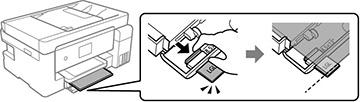
You can load
paper up to this size in the paper cassette: Legal
(8.5 × 14 inches [216 × 356 mm]).
Note: Before
loading paper, make sure your product is not currently printing,
scanning, or copying.
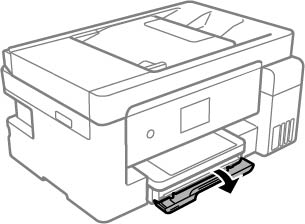
- Close the output tray, if necessary.
- Open the paper cassette cover until it clicks.
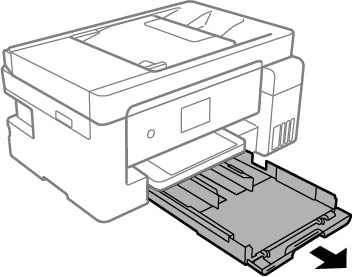
- Pull out the paper
cassette until it stops.
Note: The paper cassette cannot be removed.
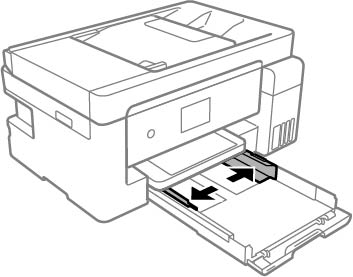
- Squeeze the tab on the right edge guide and slide the edge guides outward.
- Do one of the
following:
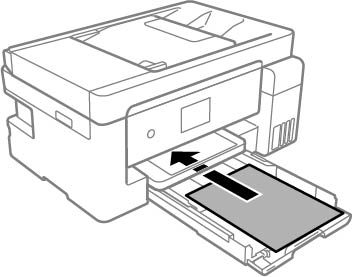
- Insert paper in the cassette with the glossy or printable side facedown and slide it in until it stops.
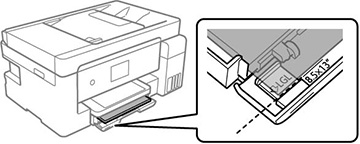
- For legal- or 8.5 × 13 inches (216 × 330 mm) paper, extend the legal paper guide and load paper using the guide line as shown.
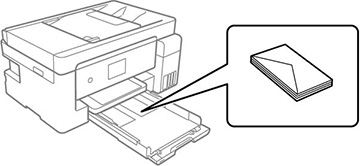
- Insert up to 10 envelopes, printable side facedown and flap edge right, as shown.
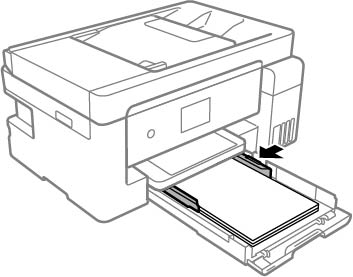
Note: Make sure envelopes are loaded against the back of the paper cassette and are not sticking out from the rear of the cassette. - Slide the edge guides
against the paper, but not too tightly.
Note: Make sure the paper fits under the tabs on the edge guides.
- Slide the cassette back into the product until it stops.
- Select the size and type of the paper you loaded on the
product LCD screen. If your paper size is not displayed, select
User Defined.
Note: If you are printing on letterhead, select Letterhead as the paper type. If you select Letterhead and you are printing on paper that is smaller than the printer driver setting, make sure you select the correct paper size setting or the printer may print beyond the edges of the paper. Two-sided printing is not available on letterhead paper.
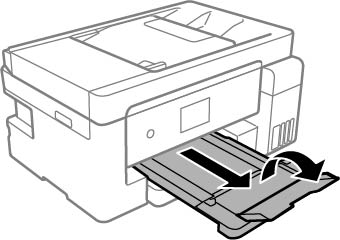
- Extend the output tray and
open the paper stopper.
Always follow these paper loading guidelines:
- Load only the recommended number of sheets.
- Load paper short edge first and printable side facedown.
- Make sure the paper fits under the tabs on the edge guides and does not stick out from the rear of the cassette.
- Do not load an envelope that is curled, folded, or too thin.
- If you have trouble loading a stack of envelopes, press each envelope flat before loading it or load one envelope at a time.
- If print quality declines when printing multiple envelopes, try loading one envelope at a time.
- Load letterhead or pre-printed paper top edge first.
- Check the paper package for any additional loading instructions.