After connecting multiple projectors to project a unified image, see the tables below to select the correct projector menu settings. Make sure your computer is connected to Projector 1 (the left-most projector in your setup).
Interactive Setup (2 Projectors)
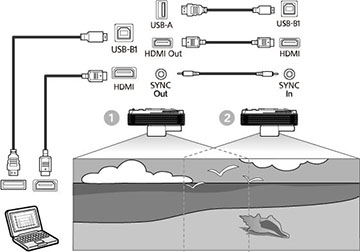
| Setting | Projector 1 | Projector 2 |
|---|---|---|
| Image Menu | ||
| Color Mode | Multi-Projection | Multi-Projection |
| Signal I/O Menu | ||
| EDID | 3240 x 1080/60Hz | 3240 x 1080/60Hz |
| Pen/Touch Menu | ||
| Installation of Projectors > Sync of Projectors | Wired | Wired |
| Multi-Projection Menu | ||
| HDMI Out Setting | Process Out | Process Out |
| Order | Specify the position of the projectors in number order from left to right | |
| Connect Computer | Yes | No |
| Edge Blending > select any edge > Blend Start Position | 0 | 0 |
| Edge Blending > select any edge > Blend Range | 600 | 600 |
Note: If you
are using the projectors in the same room as another projector that
does not support multi-projector connections, set the Installation of Projectors > Infrared Intensity setting to Strong.
Non-interactive Setup (2-4 Projectors)
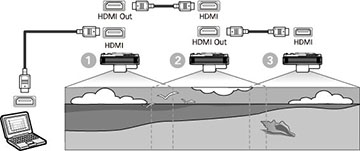
| Setting | Projector 1 | Projectors 2-4 |
|---|---|---|
| Image Menu | ||
| Color Mode | Multi-Projection | Multi-Projection |
| Multi-Projection Menu | ||
| HDMI Out Setting | Pass Through | Pass Through |
| Number of Projectors | Specify the number of projectors connected in a series | |
| Order | Specify the position of the projectors in number order from left to right | |