If an ink
cartridge is low or expended, a message appears on your product's
LCD screen. Note which ink cartridge needs to be replaced. Select
How To and follow the steps on
the LCD screen to remove and install the ink cartridges.
Make sure you have the replacement ink cartridge(s) handy before you begin. You must install new cartridges immediately after removing the old ones.
Caution:
Leave your old cartridges in the printer
until you are ready to replace them to prevent the print head
nozzles from drying out. Do not open ink cartridge packages until
you are ready to install the ink. Cartridges are vacuum packed to
maintain reliability.
- Open the ink cartridge cover.
- Push in the ink cartridge
that you want to remove until it pops out, then slowly pull it all
the way out.
Note: Dispose of used cartridges carefully. Do not take the used cartridge apart or try to refill it.
- Gently shake the new ink cartridge horizontally back and
forth about 15 times, then remove it from its package.
Caution:Do not remove any labels or seals, or ink will leak. Do not touch the green chip or the ink supply port on the cartridge. Install the new cartridge immediately after removing the old one; if you do not, the print head may dry out and be unable to print.Warning: If ink gets on your skin, wash it thoroughly with soap and water. If ink gets into your eyes, flush them immediately with water. If ink gets into your mouth, spit it out and see a doctor right away. Keep ink cartridges out of the reach of children.
- Insert the new cartridge and push it all the way in until it clicks into place.
- Close the ink cartridge cover. The home screen
appears and the product starts charging the ink. This may take a
few minutes. A status message counts down until the product is
ready. When the status message disappears, ink replacement is
complete.
Note: Do not turn off the product while charging or you will waste ink.
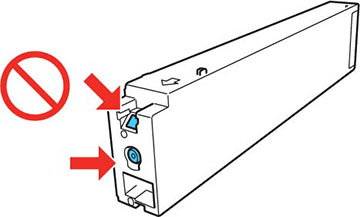
Caution:
If you remove an ink cartridge for later
use, protect the ink supply area from dirt and dust and store it in
the same environment as the printer. The valve in the ink supply
port is designed to contain any excess ink, but do not touch the
ink supply port or surrounding area. Always store ink cartridges
with the label facing up; do not store cartridges
upside-down.