Changing the Sleep Timer Settings
You can adjust the time period before your product enters sleep mode and turns off the LCD screen.
Select the
home
icon, if necessary.
Select
Settings
>
Basic Settings
>
Sleep Timer
.
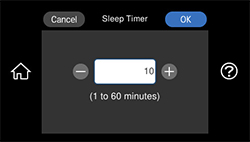
You see a screen like this:
Select a time period between 1 and 60 minutes.
Parent topic:
Using Power Saving Settings
Was this page helpful?
Yes
or
No
.
Privacy Policy
|
Your California Privacy Rights
|
Terms of Use
 home
home