You can
select or change wireless network settings using your product
control panel.
To install your product on a wireless network, follow the instructions on the Start Here sheet and install the necessary software. The installer program guides you through network setup.
Note:
Breakdown or repair of this product may cause loss of network data
and settings. Epson is not responsible for backing up or recovering
data and settings during or after the warranty period. We recommend
that you make your own backup or print out your network data and
settings.
- Press the
 home button, if
necessary.
home button, if
necessary. - Press the arrow buttons to select Wi-Fi Setup and press the OK button. You see this screen:
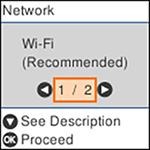
- Press the arrow buttons to select Wi-Fi (Recommended) and press the OK button twice.
- Press the arrow buttons to select Wi-Fi Setup Wizard and press the OK button.
- Press the arrow buttons to select the name of your
wireless network and press the OK button. If you do not see your
wireless network's name, you can enter it manually.
Note: To enter the wireless network name manually, select Other SSIDs and press the OK button. Enter your network name as described in the next step.
- Press the OK button on the information screen, if necessary.
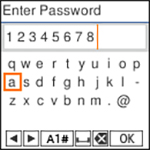
- Enter your wireless
password (or network name and then password).
- To scroll through the characters, press the arrow buttons.
- To make a selection, press the OK button.
- To change the
character case or type, select A1# or press the
 reset button.
 - To move the
cursor to the left or right, select
 or
or  .
. - To add a space, select
 .
. - To delete the
previous character, select
 .
. - When you finish entering characters, select OK.
- Do one of the following:
 start
start stop
stop
The  Wi-Fi icon displayed on the LCD
screen indicates your wireless connection status. If the product is
not connected to the network, you may have selected the wrong
network name (SSID) or entered the password incorrectly. Repeat
these steps to try again.
Wi-Fi icon displayed on the LCD
screen indicates your wireless connection status. If the product is
not connected to the network, you may have selected the wrong
network name (SSID) or entered the password incorrectly. Repeat
these steps to try again.
Wi-Fi icon displayed on the LCD
screen indicates your wireless connection status. If the product is
not connected to the network, you may have selected the wrong
network name (SSID) or entered the password incorrectly. Repeat
these steps to try again.
If you are printing from a computer, make sure you installed the network software as described on the Start Here sheet.