If you
encounter repeated paper feed issues from the cassette, clean the
paper rollers inside the product.
- Turn off the product.
- Unplug the power cable.
- Disconnect any connected cables.
- Close the document cover, if necessary.
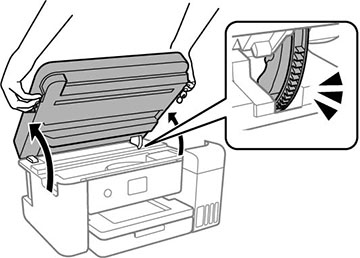
- Open the scanner unit with both hands until it locks.
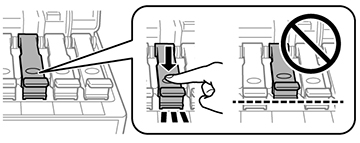
- Make sure the ink tank
caps are securely closed.
Note: If the ink tank caps are not securely closed, ink may leak.
- Close the scanner
unit.
Note: The scanner unit is designed to close slowly with slight resistance to help prevent injury to your fingers. Continue to close the scanner unit even if you feel some resistance.
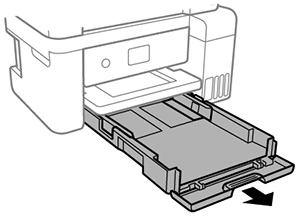
- Slide out the paper cassette and remove the paper.
- Place the product on its side with the ink tank on the
bottom.
Warning: Be careful not to trap your fingers under the product.
- Use a soft, moist cloth to clean the paper rollers, as shown. Rotate the rollers to clean them thoroughly.
- Return the product to its
normal position.
Caution:Do not leave the printer on its side for an extended period of time.
- Replace the paper, slide in the paper cassette, and connect the power cord.