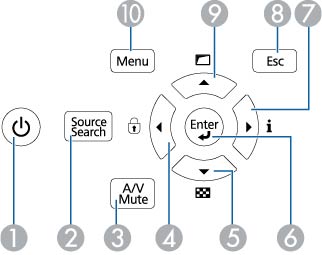
| 1 | Power button (turns on the projector) |
| 2 | Source Search button (searches for connected sources) |
| 3 | A/V Mute button (turns the video and audio on or off) |
| 4 | Left arrow button and displays the Control Panel Lock screen |
| 5 | Down arrow button and displays a test pattern |
| 6 | Enter button (selects options) |
| 7 | Right arrow button and displays the Info menu |
| 8 | Esc button (cancels/exits functions) |
| 9 | Up arrow button and displays screen adjustment options |
| 10 | Menu button (accesses projector menu system) |