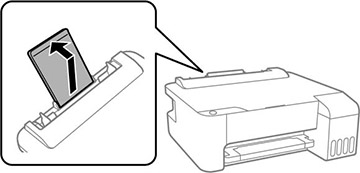
- Pull out the paper support.
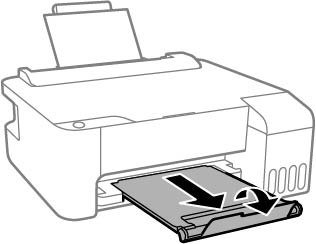
- Pull out the output tray and open the paper stopper.
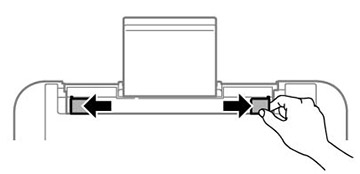
- Slide the edge guides out all the way.
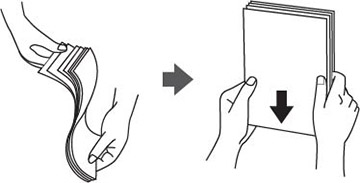
- If you are inserting a stack of paper,
fan the sheets first and tap the stack on a flat surface to even
the edges.
Note: Do not fan or curl photo paper.
- Do one
of the following:
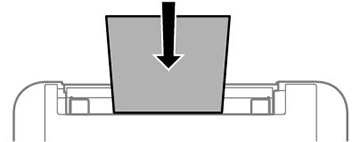
- Insert paper, glossy or printable side up and short edge first, in the center of the paper support.
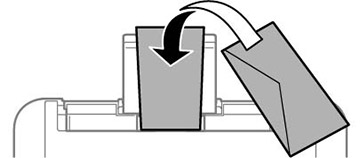
- Load up to 10 envelopes in the center of the paper support. Load them printable side up and flap edge left.
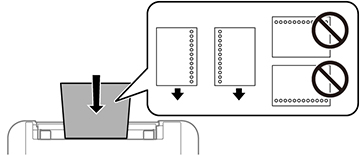
- Load a sheet of loose-leaf or other paper with holes facing as shown.
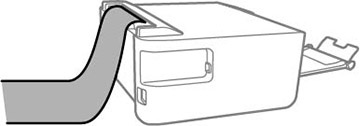
- To load a sheet of paper longer than legal size, close the paper support and flatten the leading edge of the paper as shown.
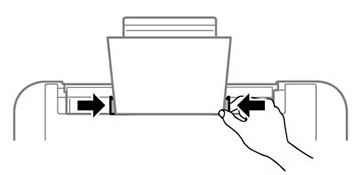
- Slide the edge guides against the paper, but not too tightly.
Always follow
these paper loading guidelines:
- Load only the recommended number of sheets.
- Load paper short edge first. However, when you have set the long edge as the width of the user-defined size, load paper long edge first.
- Do not load paper above the line just under the arrow mark inside the edge guide.
- If you have trouble loading a stack of envelopes, press each envelope flat before loading it or load one envelope at a time.
- Do not load envelopes that are curled, folded, or too thin, or that have plastic windows or exposed adhesive flaps.
- Check the paper package for any additional loading instructions.
- If you use paper with binder holes, load only one sheet at a time in only these sizes: Letter (8.5 × 11 inches [216 × 279 mm]), A4 (8.3 × 11.7 inches [210 × 297 mm]), or Legal (8.5 × 14 inches [216 × 356 mm]).
- Do not load paper that is wavy, torn or cut, folded, damp, too thick or too thin, or has stickers.
-
Return the remaining paper to its package. If you leave it in the printer, the paper may curl or the print quality may decline.