Control Panel Buttons and Lights
1
power
button and light
2
Wi-Fi
and
Wi-Fi Direct
network status lights
3
Wi-Fi
button
4
network status
button
5
B&W copy
button
6
color copy
button
7
stop
button
8
ink
and
paper
lights
Light status
Condition/solution
power
light is on
The product is turned on.
Wi-Fi
light is on
The product is connected to a wireless network.
Wi-Fi Direct
light is on
The product is connected to a device using Wi-Fi Direct.
Parent topic:
Product Basics
Was this page helpful?
Yes
or
No
.
Privacy Policy
|
Your California Privacy Rights
|
Terms of Use
 power light is on
 Wi-Fi light is on
 Wi-Fi Direct light is
on
Wi-Fi Direct light is
on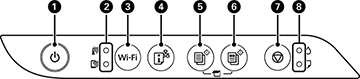
 network status
 B&W copy
 color copy
 stop
stop ink
ink paper
paper