Follow these
guidelines to enter characters for passwords and other settings.
Use the arrow buttons on the control panel to navigate the
on-screen keyboard, and press the OK button to select the desired
character.
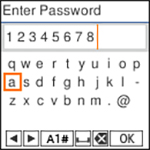
- To move the cursor, select the left or right arrows.
- To change the character case or enter numbers or symbols,
select A1# or press the
 reset button on the control
panel.
reset button on the control
panel.
- To enter a space, select
 .
.
- To
delete the previous character, select
 .
. - Select OK, then press the OK button when you are finished entering characters.