You can
select a variety of layout options for your document or photo by
selecting Layout from the pop-up
menu or expanding it on the print window.
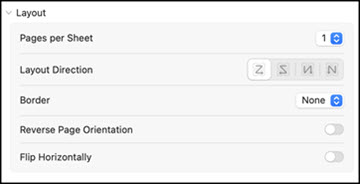
- To print multiple pages on one sheet of paper, select the number of pages in the Pages per Sheet pop-up menu. To arrange the print order of the pages, select a Layout Direction setting.
- To print borders around each page on the sheet, select a line setting from the Border pop-up menu.
- To print on both sides of each page, select a setting from the Two-Sided pop-up menu.
- To invert or flip the printed image, select the Reverse page orientation or Flip horizontally settings.