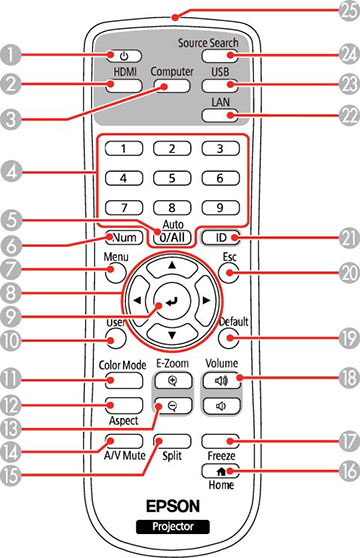
| 1 |
Power button |
| 2 |
HDMI button (cycles through connected HDMI
and video sources) |
| 3 |
Computer button |
| 4 |
Numeric buttons |
| 5 |
Auto button (automatically adjusts position,
tracking, and sync settings when projecting analog RGB signals from
the Computer ports) |
| 6 |
Num button (when held down, switches numeric
buttons to number function) |
| 7 |
Menu button (accesses projector menu
system) |
| 8 |
Arrow buttons (move through
on-screen options) |
| 9 |
 Enter button (selects
options) Enter button (selects
options) |
| 10 |
User button (customizable for different
functions) |
| 11 |
Color
Mode button (selects display modes) |
| 12 |
Aspect button (selects the image aspect
ratio) |
| 13 |
E-Zoom
+/- buttons (zoom into and out of the image) |
| 14 |
A/V
Mute button (turns off picture and sound) |
| 15 |
Split button (splits the screen between up to
four image sources) |
| 16 |
 Home button (accesses projector Home
screen) Home button (accesses projector Home
screen) |
| 17 |
Freeze button (stops video action) |
| 18 |
Volume up/down buttons (adjust speaker
volume) |
| 19 |
Default button (returns the current setting
to its default) |
| 20 |
Esc button (cancels/exits functions) |
| 21 |
ID button (selects a projector to use with
the remote control) |
| 22 |
LAN button (connects to a network
source) |
| 23 |
USB button (cycles between USB Display and
USB-A port) |
| 24 |
Source
Search button (searches for connected video sources) |
| 25 |
Remote control emitter |