You can press the  Job/Status button to view the
status of your product or print jobs.
Job/Status button to view the
status of your product or print jobs.
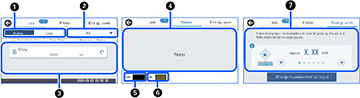
| 1 | Select to view active jobs or the job history |
| 2 | Select a job filter |
| 3 | Displays a list of ongoing jobs or the job history |
| 4 | Displays any errors; select the error for details |
| 5 | Displays approximate ink level |
| 6 | Displays approximate maintenance box level |
| 7 | Displays the estimated power consumption* |
*The displayed power amount is a guideline value for general use and may vary depending on how you use this product. It is calculated using the following formula.<The amount of power required to print on one sheet of paper with this product> × <The number of sheets printed in the past 7 days>
* TEC is an abbreviation of Typical Electricity Consumption and is the power consumption (kWh) for a standard week (5 days of repeated operation and sleep/off and two days of sleep/off). This value is used as a reference value to comply with the "International Energy Star Program".