Follow these guidelines as you load media in your product and remove printed media:
- Maintain a constant room temperature when using Epson special media; optimal conditions are between 59 °F (15 °C) and 77 °F (25 °C), with 40 to 60% humidity. Changes in temperature and humidity may cause paper to become wavy or curled.
- Avoid touching the printable surface of the paper with your bare hands; moisture and oils from your hands can affect print quality.
- Handle paper by the edges but do not rub your hands along the edges of the media; the sharp edges could cut you. Wear cotton gloves when handling media, if possible.
- Do not fold the media or otherwise damage its printable surface; do not get the media wet.
- Make sure media is clean from debris and dust before loading.
- Do not throw away the paper packaging as you can use it to store the paper.
- If you are loading Epson UltraSmooth Fine Art Paper, disable the Auto Loading setting or the pressure roller may leave marks on the surface of the paper.
- Do not remove or insert the paper cassette while printing from the paper cassette. It may cause print quality to decline or cause a paper jam. If you remove the paper cassette while printing, wait until printing is complete to reinsert the paper cassette.
- When loading paper in the paper cassette, follow the steps on the LCD screen and always remove the paper cassette from the printer to load paper in it. If paper is loaded while the paper cassette is still in the printer, it could cause print quality to decline or cause a paper jam.
- Load media just before printing on it to avoid creases from the pressure rollers; creases may cause jams or cause the media to rub against the print head. Remove roll paper that is not in use from the printer; if roll paper is left in the printer for a long period of time, paper quality may decline. Rewind the media and store it in its original packaging.
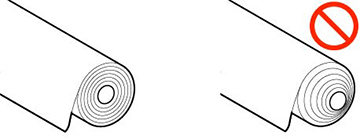
- Do not load media if the edges are uneven on the roll; this
could cause feeding problems. Rewind the media on the roll or use a
different roll.
- Place unused media in its original packaging for storage. Keep the media dry and avoid storage locations that are subject to direct sunlight, excessive heat, or high humidity. Store cut sheets flat to prevent curling.
- Do not use media that is too thick, too thin, wrinkled, torn, cut, folded or creased, curled, or has a sticker or tape on it; otherwise, the media may jam or the prints may be soiled. (See the link below for paper specifications.) Flatten the paper before use by bending it in the opposite direction. For roll paper, cut off any damaged ends and reload the roll. For cut sheets, use new paper.
- Make sure to remove any protective tape from the media before loading, otherwise paper jams could occur.
- Dry printed media completely before folding or stacking it. Do not touch, rub, or scratch the printed surface, otherwise you may damage the print.
- Do not place prints in an album before they are completely dry, otherwise you may blur the ink.
- Do not use a dryer to dry the prints.
- Display and store printed media as instructed in the media documentation.
- Avoid placing prints in direct sunlight.
- Typically, prints and photos can fade over time due to the effects of light and various environmental factors. This also applies to Epson special media, however, the degree of color distortion can be minimized by following proper storage procedures. See the documentation supplied with Epson special media for detailed information on handling the paper after printing.
Note: The colors
of photos, posters, and other printed materials may appear
different under different lighting conditions.